


Copilot Search Optimization: Why Traditional Search Tactics Fall Short
How to Improve Visibility in Copilot Search
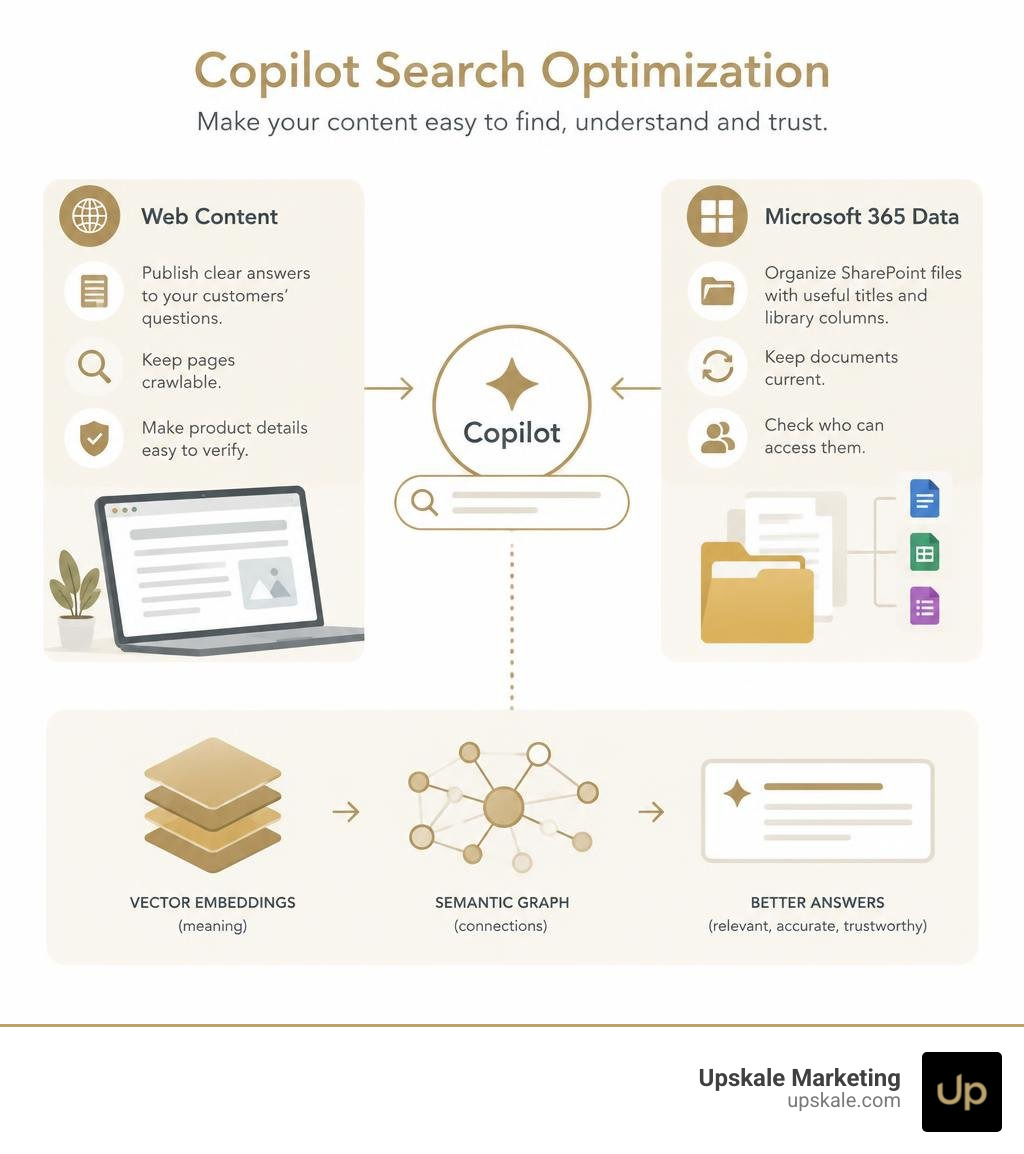
Start with the content Copilot can find and use. For public web visibility, publish clear answers to the questions your customers ask, keep pages crawlable, and make product details easy to verify. For Microsoft 365 Copilot, organize SharePoint files with useful titles and library columns, keep documents current, and check who can access them.
Traditional keyword tactics alone fall short because Copilot can look for meaning, not just matching words. It may use web content or, in a workplace, permitted organizational data to ground an answer. The goal is to make the right information easy to retrieve, understand, and trust.
I’m Scott Brazdo, MBA, founder of Upskale Marketing. I bring more than 30 years of marketing and brand-building experience to Copilot search optimization, helping businesses adapt their content to how people now search and ask questions.
The Architecture of Copilot Search Optimization
To understand how Copilot retrieves and generates responses, we must look beneath the traditional search bar. Standard search engines index pages by cataloging text and matching strings. Microsoft Copilot operates on an advanced semantic layer designed for winning the next era of generative search engine optimization.

At the heart of this system is semantic indexing. Rather than simply logging words, semantic indexing converts text, documents, emails, and conversations into high-dimensional mathematical representations known as vector embeddings. When a user asks a question, Copilot evaluates the conceptual proximity between the prompt and indexed content across billions of vectors.
This infrastructure is enabled automatically at the tenant and user levels within Microsoft 365 environments, requiring no complex administrative installation to begin operating. Copilot couples these vector indices with traditional keyword lookups to ensure responses are both contextually sound and factually grounded.
How Microsoft Graph Powers Copilot Search Optimization
Microsoft Graph serves as the central nervous system connecting user activities, organizational data, and Copilot’s reasoning engine. When an employee or customer interacts with Copilot, Microsoft Graph supplies the critical context necessary for accurate grounding.
Graph aggregates signals across emails, chats, calendar invites, files, and enterprise repositories. When a query is initiated:
- Context Collection: Copilot queries Microsoft Graph to gather active context, including the user’s role, recent collaborative files, and working relationships.
- Grounding: The original user prompt is enriched with this organizational background, transforming a vague question into a highly specific technical request.
- Synthesis: The Large Language Model (LLM) processes the grounded prompt against indexed data and generates an answer tailored directly to the business context.
Security, Compliance, and Data Boundary Controls
A common concern among business leaders is data safety. Copilot search adheres strictly to the existing security, privacy, and compliance boundaries of your environment:
- Role-Based Access Control (RBAC): Copilot never surfaces data a user does not already have permission to view. If an employee lacks access to a confidential SharePoint folder, Copilot cannot pull answers from those files for that user.
- Data Privacy Boundaries: Operations respect regional data commitments, including GDPR and the EU Data Boundary.
- Customer Key Encryption: Content is safeguarded using Microsoft Purview Customer Key encryption at rest and in transit.
- Data Minimization: Prompts, grounded responses, and semantic vector data are not used to train the underlying foundation models.
Lexical Indexing vs. Semantic Indexing: How Copilot Interprets Intent
Traditional enterprise and web searches rely heavily on lexical indexing, which matches explicit keywords. If a user searches for “revenue trajectory,” a lexical engine looks specifically for documents containing those exact terms.
Semantic indexing redefines this paradigm by interpreting user intent, identifying synonyms, and understanding conceptual context.
| Feature | Lexical Indexing | Semantic Indexing |
|---|---|---|
| Primary Mechanism | Keyword and string matching | Vector embeddings and mathematical similarity |
| Intent Understanding | Literal query parsing | Conceptual and contextual interpretation |
| Query Flexibility | Rigid; requires exact phrasing | Flexible; maps synonyms and related terminology |
| Contextual Awareness | Low; evaluates isolated terms | High; evaluates relationships between entities |
| Grounding Scope | Static text retrieval | Dynamic synthesis via Microsoft Graph |
Processing Billions of Vectors for Contextual Grounding
Semantic indexing enables systems to search through billions of vectors in milliseconds. Each vector captures subtle semantic properties of text.
For instance, if a team member queries, “Find the customer feedback where the client was thrilled with our interface revamp,” a lexical engine might fail if the document uses words like ecstatic, delighted, or UI redesign. Semantic search recognizes that these terms occupy adjacent mathematical coordinates in vector space, allowing Copilot to surface the exact file required without relying on literal word matches.
How Copilot Maintains Content Freshness and Index Updates
For search optimization to succeed, information must remain current. Copilot balances index freshness through automated pipelines:
- Mailbox and Communication Streams: Emails, calendar events, and team communications update in near-real-time.
- SharePoint and Web Content: Document repositories, intranet pages, and public web documents undergo regular crawling and daily vector updates to reflect revisions, deletions, and newly introduced files.
Connecting Content Sources: Files, Metadata, and Connectors
Visibility in Copilot requires structuring content so vectorization engines can parse and index it without friction. Implementing modern AI search algorithm strategies ensures your data architecture supports seamless retrieval.

Copilot supports a broad array of file types, including DOCX, PPTX, PDF, ASPX web pages, and OneNote files. Individual files up to 512 MB can be processed, provided the underlying text is accessible and not locked inside unindexed image scans.
Scoped Queries and SharePoint Library Column Metadata
When users interact with Copilot, they frequently scope their requests by referencing specific SharePoint document libraries, sites, or folders.
During scoped queries, Copilot leverages both the document content and SharePoint library column metadata. Custom properties—such as Department, Status, Document Type, or Review Date—act as structural filters. Clean metadata helps Copilot pinpoint relevant files rapidly, improving answer accuracy and reducing hallucination risks.
Ingesting Third-Party Repositories with Enterprise Connectors
Copilot’s retrieval capabilities extend beyond native Microsoft files. Through Copilot connectors, organizations can integrate external platforms such as CRM systems, issue trackers, and external knowledge bases.
Ingesting third-party data into the unified index allows Copilot to provide universal search answers. Administrators can also configure curated answers—such as bookmarks and definitions—to ensure users receive approved, official company answers for common operational inquiries.
Best Practices for Structuring Web and Enterprise Assets
Whether you are optimizing public-facing web pages for Edge Copilot or structuring internal assets for Microsoft 365 Copilot, content organization dictates citation frequency. Adopting practical techniques for AI search optimization ensures your assets remain discoverable.
Executing Copilot Search Optimization Across Web and Enterprise Documents
To maximize search visibility, format your content to be easily digested by AI engines. Focusing on preparing content for conversational AI engines involves several structural adjustments:
- Modular, Chunkable Content: Break lengthy manuals and articles into self-contained sections. Each paragraph should focus on a distinct concept.
- Question-Based Headings: Use clear H2 and H3 headings phrased as natural questions, followed immediately by direct answers.
- Structured Data: For public websites, apply schema markup (Organization, Product, FAQPage) to help browsing assistants identify product details and core information.
- Consistent Terminology: Maintain clear entity naming conventions across documents to prevent ambiguity during vector generation.
Governance and Access Management to Prevent Oversharing
An essential aspect of enterprise search optimization is data governance. Because Copilot surfaces content efficiently, oversharing can expose sensitive materials to employees who should not see them.
- Apply sensitivity labels through Microsoft Purview to restrict internal dissemination.
- Implement Data Loss Prevention (DLP) policies to govern confidential data.
- Periodically audit SharePoint site permissions to ensure sensitive sites are excluded from broad internal indexing where appropriate.
Frequently Asked Questions About Copilot Search Optimization
How do administrators enable or manage the semantic index in a tenant?
Semantic indexing is enabled automatically for organizations with supported Copilot licensing. Administrators do not need to install local vector infrastructure. Management occurs within the Microsoft 365 Admin Center and the Search and Intelligence portal, where administrators can configure connectors, manage item insights, and exclude specific SharePoint sites from indexing if necessary.
What file formats and size constraints does the semantic index support?
Copilot supports common enterprise formats, including Microsoft Word (.docx), PowerPoint (.pptx), OneNote (.one), web files (.aspx), and Adobe PDF (.pdf). Files up to 512 MB can be processed, provided the text is machine-readable and standard permission structures are maintained.
How does Microsoft Copilot distinguish between internal data and open web answers?
Copilot uses dual-context retrieval. When working inside Microsoft 365 applications, it prioritizes organizational grounding via Microsoft Graph to assist with task completion and internal workflows. When accessed through browsers or general chat modes, it pulls grounding data from the Bing web index, using public web pages, structured data, and authoritative citations to answer consumer and market queries.
Conclusion
As conversational search continues to transform how people discover information, relying exclusively on classic keyword tactics is no longer enough. Gaining visibility across modern answer engines requires a structured approach that emphasizes semantic clarity, sound metadata architecture, and verifiable authority.
At Upskale Marketing, we specialize in helping businesses navigate this shift through comprehensive enterprise AI optimization solutions. Our team focuses on positioning your brand as a trusted, primary answer across next-generation discovery platforms.
To see how your organization currently performs and uncover opportunities to enhance your digital presence, schedule a free AI evaluation with Upskale Marketing today. We will provide a straightforward, data-driven assessment of your visibility across modern AI search engines.